
讓我們來探索如何在 Laravel 12 中產生應用程式金鑰。此金鑰對於加密資料和確保 Laravel 專案的安全至關重要。 Laravel 在 Laravel 中提供了加密的應用程式金鑰。每個 Laravel 專案都有自己的應用程式金鑰。它們會根據應用程式密鑰產生密碼、加密資料等。因此,當您取得新的 Laravel 時,請在 .env…
Build, Test and Manage Your Websites on MAC
MAMP
MAMP is your free local server environment with Apache, Nginx, PHP, and MySQL. It runs on macOS and Windows.
https://www.mamp.info/en/mamp/mac/
After Download
Set Preference – > Apache Port : 2802
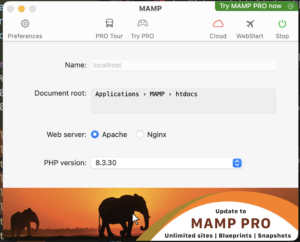
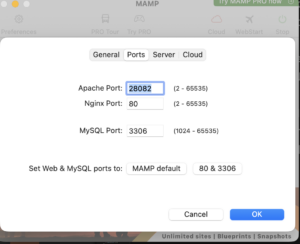
Open and Edit httpd.conf
Path on Mac OS : /Applications/MAMP/conf/apache/httpd.conf
i) Change port number
Listen 28082
ServerName localhost:28082
ii) Put below lines on the last row
Define test_PJ_ROOT3 “/Applications/MAMP/htdocs/Project-name”
<VirtualHost xxxxlocal.com:28082>
ServerName xxxxlocal.com:28082
RewriteEngine on
DocumentRoot “${test_PJ_ROOT3}/laravel/public/”
<Directory “${test_PJ_ROOT3}/laravel/public/”>
RewriteCond %{REQUEST_FILENAME} !-f
RewriteCond %{REQUEST_FILENAME} !-d
RewriteRule . index.php
DirectoryIndex index.php
Require all granted
</Directory>
</VirtualHost>
To set a local domain to an IP address on a Mac, you will need to edit the system’s hosts file using the Terminal. This requires administrator (sudo) privileges.
這是一個準確且常見的進階操作。在 Mac 上編輯 hosts 檔案,通常是為了在開發環境中對應本地網域(例如將
mysite.local 對應到 127.0.0.1)。以下是執行此操作的標準步驟:
- 開啟終端機 (Terminal)。
- 輸入指令:輸入
sudo nano /etc/hosts並按下 Enter。 - 驗證權限:輸入你的 Mac 登入密碼(輸入時不會顯示字元)。
- 加入對應:在檔案末端加入一行,格式為:
[IP位址] [空白] [自定義網域]。- 例如:
127.0.0.1 xxxxlocal.com
- 例如:
- 儲存並退出:按下
Control + O儲存,再按下Enter確認,最後按下Control + X退出。 - 清除快取(選用):若設定未立即生效,可執行
sudo killall -HUP mDNSResponder。
在 macOS 上,Apache 的 RewriteEngine 和 DocumentRoot 設定無效,通常是因為核心模組未啟用或權限覆蓋(AllowOverride)被停用
https://shorturl.at/CJl1g
1. 啟用
mod_rewrite 模組macOS 內建的 Apache 預設會註解掉重寫模組。
-
- 開啟設定檔:
sudo nano /etc/apache2/httpd.conf - 尋找以下內容並移除前面的
#:apacheLoadModule rewrite_module libexec/apache2/mod_rewrite.so2. 修正目錄權限 (AllowOverride)即使你在 VirtualHost 裡寫了規則,如果全域設定將
AllowOverride設為None,這些規則(包括.htaccess)會被忽略。- 在同一個
httpd.conf檔案中,找到對應你專案路徑的<Directory>區塊。 - 將
AllowOverride None改為AllowOverride All。 - 確保區塊內包含
Options FollowSymLinks。
3. 檢查 DocumentRoot 路徑你提供的設定使用了變數${test_PJ_ROOT3}。- 環境變數問題:Apache 可能無法識別自定義的 shell 變數。建議直接寫入完整路徑,例如:
DocumentRoot "/Users/你的用戶名/Sites/laravel/public/" - 結尾斜線:
DocumentRoot的路徑結尾通常不加斜線,而<Directory>標籤內的路徑則建議加上。
4. 修正 macOS 檔案系統權限macOS 的_www用戶需要存取你個人資料夾下的檔案。- 給予存取權:確保從根目錄到
public資料夾,Apache 用戶都有讀取權限。 - Laravel 特定目錄:Laravel 需要對
storage和bootstrap/cache有寫入權限:bashsudo chmod -R 775 storage bootstrap/cache sudo chown -R :_www storage bootstrap/cache
5. 重啟 Apache 服務每次修改設定後,必須重啟才能生效:bashsudo apachectl restart ``` **建議做法**:如果問題依然存在,請檢查 Apache 錯誤日誌以獲取具體報錯資訊: `tail -f /var/log/apache2/error_log` 您目前是使用 macOS **內建的 Apache** 還是透過 **Homebrew** 安裝的版本?INSTALL on Mac OS
1======================
cd laravel
composer update
2======================
Open \Laravel\env_file
Edit : .env_local . Then set the local database setting (DB_DATABASE,DB_USERNAME,DB_PASSWORD )
Run : php deploy_local.php
Run : php artisan config:clear
Run : php artisan config:cache
3======================
Run : php artisan migrate
4======================
Run : php artisan reload_middleware_rule
- 在同一個
- 開啟設定檔:
相關貼文